
Event-Density Calendar: When Time Becomes a Visual Widget
May 19, 2026
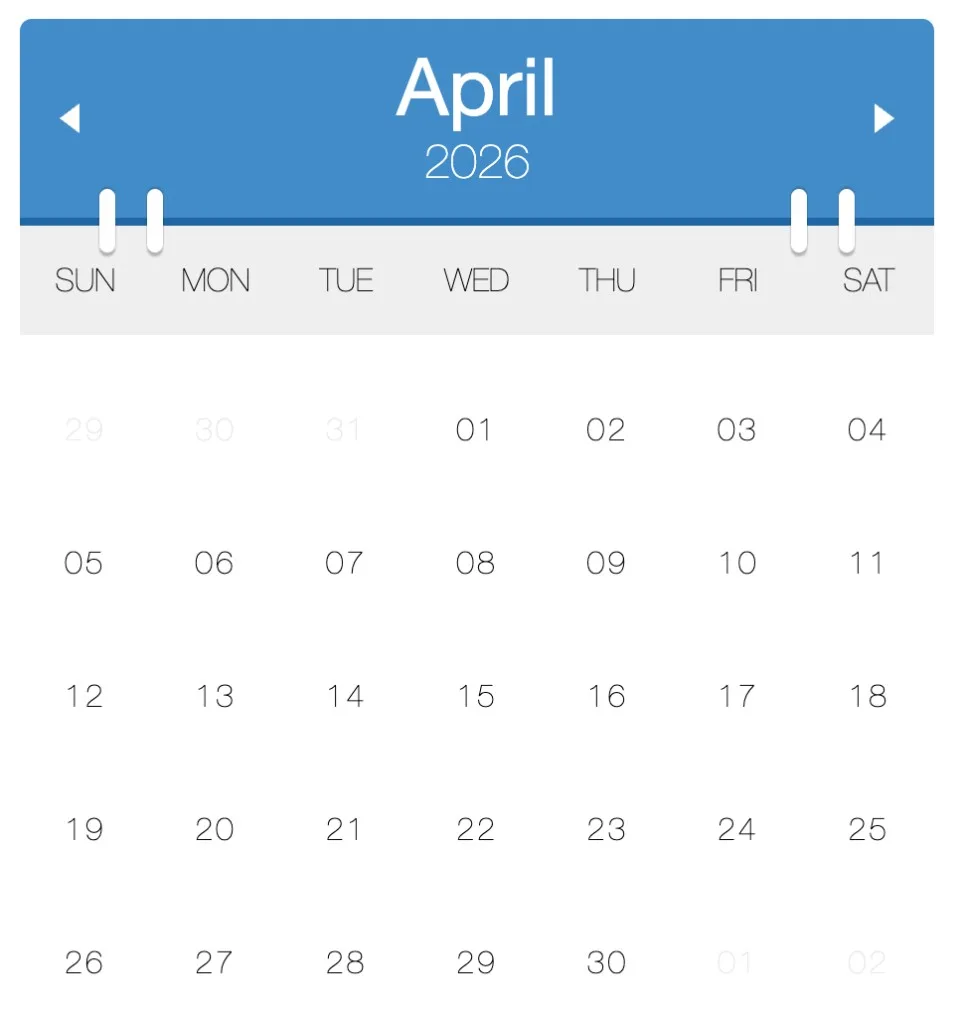
Event-density calendar
I wanted a calendar that felt like something on a desk—not a spreadsheet, not a dense agenda list.
So I built a small flip-calendar widget on CodePen: a blue header with month and year, white “binder” rings bridging into the grid, thin sans-serif day numbers, and ghosted leading/trailing dates so the current month stays in focus. Arrow controls slide the month in and out. Under that calm surface, each day can carry a blue circle whose size encodes how many events landed that day; tap a busy day and a detail panel opens in the week row below.
No backend, no build step—Moment.js, vanilla DOM, and CSS that still holds up years later.
Try it live — CodePen embed
The iframe keeps the pen’s own styles isolated from this site’s dark theme. Use the header arrows, click a day with a blue circle, and open the detail strip under that week.
Blank iframe? Open the pen on CodePen.
The pen ships with January 2017 sample data (originally a threat-intel calendar—malware and bot names on busy days). Fork it and swap in deploys, habits, or incidents; the mechanic stays the same.
The look: flip calendar, flat UI
The cover is the quiet state: minimal grid, tactile header.
| Element | Role |
|---|---|
| Blue header | Month in large white type, year beneath, prev/next triangles |
| Binder rings | Four white bars overlapping the header edge—desk-calendar affordance |
| Weekday bar | Light gray band, uppercase SUN–SAT |
| Grid | Centered day numbers; adjacent-month dates faded |
| Circles | Hidden when empty; scaled blue dots when events exist |
| Detail panel | Expands under the week row with colored event rows and a pointer arrow |
That hierarchy matters: you read the month first, then volume (circle size), then titles (only after a click). It is intentional progressive disclosure—not everything shouting at once.
Why time widgets are still worth building
Dates are the one coordinate system every user already knows. That makes the month grid a universal canvas for data:
| Pattern | What the user reads instantly |
|---|---|
| Dot calendar | Something happened (binary) |
| Heat map | Intensity across days (GitHub contributions) |
| Agenda list | Exact schedule (Google Calendar) |
| Event-density grid | How heavy a day was, then drill-down on demand |
The density approach trades all-day precision for pattern recognition. You are not answering “What time is my dentist?” You are answering “Which week in Q1 looked like a dumpster fire?” or “When did incidents cluster?”
Security dashboards, habit trackers, and release calendars all flirt with the same idea: encode volume in the cell before you encode detail in a tooltip.
What is running under the hood
The widget is a small state machine drawn with DOM APIs:
events[] → draw month grid → scale circle by count / maxCount → click → inject .details row
1. Normalize dates. On each redraw, event entries are converted with Moment so comparisons use isSame(day, 'day').
2. Build the grid. The current month is filled day by day; leading and trailing cells come from backFill and fowardFill so the grid is always six rows of weeks. Each cell gets a day-number and a circle span.
3. Density encoding. The code finds the busiest day in the dataset (maxEvents), then scales each circle:
var size = (1 / this.maxEvents) * todayEvents.events.length;
circle.style.transform = 'scale(' + size + ')';
Quiet days keep a zero-scale circle (invisible). Busy days approach full size. It is a linear map, not a log scale—honest and easy to reason about when you have five events, not five hundred.
4. Interaction model. Only days with events are clickable. openDay injects a .details block as a sibling inside the week row, positions a triangular .arrow under the clicked cell, and lists colored event rows. Switching days in the same week reuses the container and animates the list out/in.
5. Month transitions. Changing month sets next or prev, re-draws, and applies CSS classes month out / month in with keyframed slides.
6. Angular wrapper (original). The CodePen shipped an ng-app directive that passed sample data into new Calendar('#calendar', data). The calendar engine itself is plain DOM; Angular was only the glue.
A blog-side copy of the vanilla engine lives in assets/demo/ if you want to read or fork without CodePen’s iframe.
The stack (CodePen era)
- Moment.js — month boundaries,
isSame, add/subtract months - Vanilla
Calendarconstructor — explicitcreateElementand class toggles - LESS → CSS — binder rings, header typography, month slide animations
- CodePen — instant share link, zero build step
The pen’s README still says the quiet part out loud: “A calendar that tells you how many events happened on a particular date.” That one sentence is the product spec.
What I would change today
If I refreshed the project now:
- Temporal or Luxon — Moment is in maintenance mode; modern codebases should start elsewhere.
- Accessibility — keyboard focus per day,
aria-expandedon the detail panel,aria-labelthat reads “3 events” not only a bigger circle. - Responsive width — the original fixed ~480px layout; fluid
max-widthwould help on large screens. - Data API — accept
events: { date, items[] }[]from JSON fetch instead of hard-coded arrays; keep the renderer dumb. - Reduced motion — respect
prefers-reduced-motionand skip month slides for users who need it.
None of that undermines the core idea: time is not only a list—it is a shape, and circles that breathe with workload are a legible shape.
The lesson I still keep
The best widgets do not add a new metaphor. They bend one you already know—the wall calendar, the month view—and add one extra channel (density) before they ask for a click.
This pen was never a SaaS. It was a visual argument: you can see busy season without reading every title. In a world of infinite agenda scroll, that is still a gift.
Fork it, pipe CI failures into the array, and watch release week swell. You will learn more about your timeline from the circles than from another notification badge.
CodePen: codepen.io/maggiben/pen/OPmLBW · Source copy: assets/demo/ · Sample data: January 2017 threat-intel theme