
I Built Explorer for S3: A Desktop GUI That Feels Like a File Manager
March 15, 2026
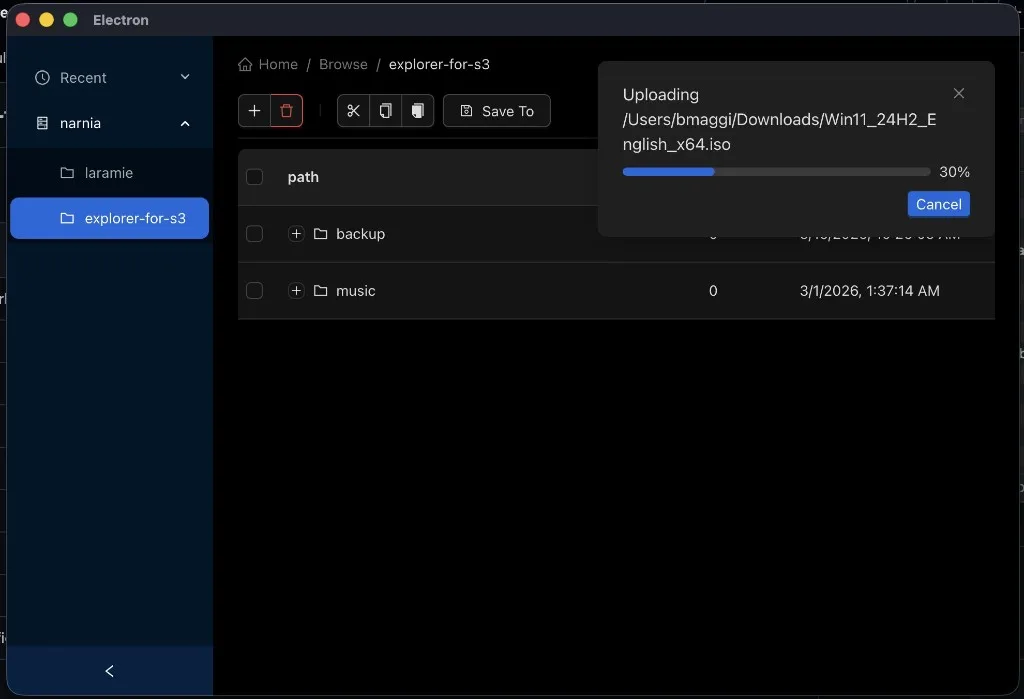
Explorer for S3
I reach for S3 constantly—backups, build artifacts, media, the odd ISO I swear I will boot "this weekend."
The AWS Console is fine when I need IAM policies or lifecycle rules. The CLI is perfect in scripts. Neither feels like moving files when I already know what I want: open a folder, drag something in, watch the progress bar, done.
So I built Explorer for S3—a desktop app that treats your bucket like a drive on your machine.
The problem I was solving
S3 is object storage, not a filesystem. That distinction is correct—and also annoying when your muscle memory says Finder or Explorer.
I kept bouncing between:
- AWS Console — powerful, but web-heavy and not where my local files live
aws s3 cp— great in CI, tedious for "upload this folder and tell me when it finishes"- Third-party clients — often closed-source, subscription-shaped, or missing the workflows I care about (custom endpoints, local dev against Garage, cancelable multipart uploads)
I wanted something I could run locally, trust with keys, and ship for macOS, Windows, and Linux without rewriting the UI three times.
What it feels like to use
The screenshot above is the real app: dark UI, bucket tree on the left, breadcrumb path across the top, and a file table in the middle.
Day to day, it behaves the way you'd expect from a file manager:
- Browse buckets and prefixes in a tree table (folders expand; files show size and last modified)
- Upload by drag-and-drop onto the window—or onto a specific folder row
- Download selected objects (including folder trees) to a path you pick
- Cut, copy, and paste objects inside the bucket (S3 copy + optional delete for move)
- Delete with confirmation through the toolbar
- Recent locations in the sidebar so you can jump back quickly
- Save To links a connection into a saved bucket profile for faster switching
Large uploads surface as persistent notifications with a live progress bar and a Cancel button. Yes, that progress panel is uploading a Windows 11 ISO—because if the tool can't handle a multi-gigabyte multipart upload without freezing the UI, it's not done.
Under the hood (without the black box)
Explorer for S3 is an Electron app scaffolded with electron-vite, with a clean split:
| Layer | Role |
|---|---|
| Renderer (React 19 + Ant Design) | File browser UI, Jotai state, React Router, i18next |
| Preload | Typed bridge to the main process |
| Main (Node) | AWS SDK v3 calls, SQLite cache, encrypted secrets, native drag |
S3 operations that respect real files
The main process uses @aws-sdk/client-s3 and @aws-sdk/lib-storage so uploads are multipart with httpUploadProgress events streamed back over IPC. Downloads and uploads both support AbortController—when you hit Cancel, the in-flight transfer actually stops.
Custom endpoints (MinIO, Garage, LocalStack, etc.) work via forcePathStyle when you configure a non-AWS endpoint—handy for local dev.
The repo ships a Garage setup script: one command spins up S3-compatible storage in Docker and prints access keys you can paste into the app. That loop—./garage/setup.sh, add connection at http://localhost:3900, browse—is how I dogfood without touching production buckets.
A local index so browsing stays snappy
Listing a large prefix from S3 on every click gets old fast. After you connect, the app syncs object metadata into SQLite (via Sequelize) and serves the table from that cache. Keyword search, pagination cursors, and folder parent checks all run against the local model; mutations update S3 and the DB together.
Credentials that stay on your machine
Access keys are not stored in plain text. The main process uses Electron safeStorage for a master key, then AES-256-GCM for sensitive fields at rest. If secure enclave storage isn't available on a platform, the app fails loudly rather than pretending.
Desktop affordances you don't get in a web console
- Drag out a file to the OS (signed URL when possible; native drag fallback otherwise)
- Drag in local paths resolved through the preload API (browser
Fileobjects don't expose full paths—Electron does) - Tray icon and standard window lifecycle on macOS vs Windows/Linux
- Auto-updates wired through electron-updater with GitHub releases
Quality bar: tests and builds
This is a utility people will run with real data, so I kept the bar practical:
- Vitest for path/tree utilities and other pure logic
- Playwright end-to-end tests against the packaged Electron app
- GitHub Actions for CI and release artifacts
Build targets are first-class in the README:
git clone https://github.com/maggiben/explorer-for-s3.git
cd explorer-for-s3
npm install
npm run dev          # development
npm run build:mac    # or build:win / build:linux
What I learned building it
Progress UX is part of the product. S3 uploads are inherently async and chunked; if the UI doesn't show per-file progress and let you abort, users assume the app hung.
A cache is a feature, not a cheat. Object storage APIs are optimized for scale, not for "click folder, see children in 16ms." A synced SQLite mirror makes the UI feel native—as long as you reconcile on connect and after mutations.
Path-style endpoints matter. Supporting Garage and other S3-compatible backends forced forcePathStyle and explicit regions into the connection model early, which saved pain later.
Electron is still the right hammer for this nail. File paths, native drag-and-drop, encrypted local storage, and one React codebase across three OSes—hard to replicate in a pure web app without giving up something important.
Try it
If you live in S3 buckets but think in folders, Explorer for S3 is for you.
Clone the repo, point it at AWS or a local Garage instance, and drag a big file in. Watch the progress bar. Cancel it halfway if you're feeling chaotic.