
MediaPipe Hands: When Your Webcam Becomes a 3D Skeleton
May 19, 2026
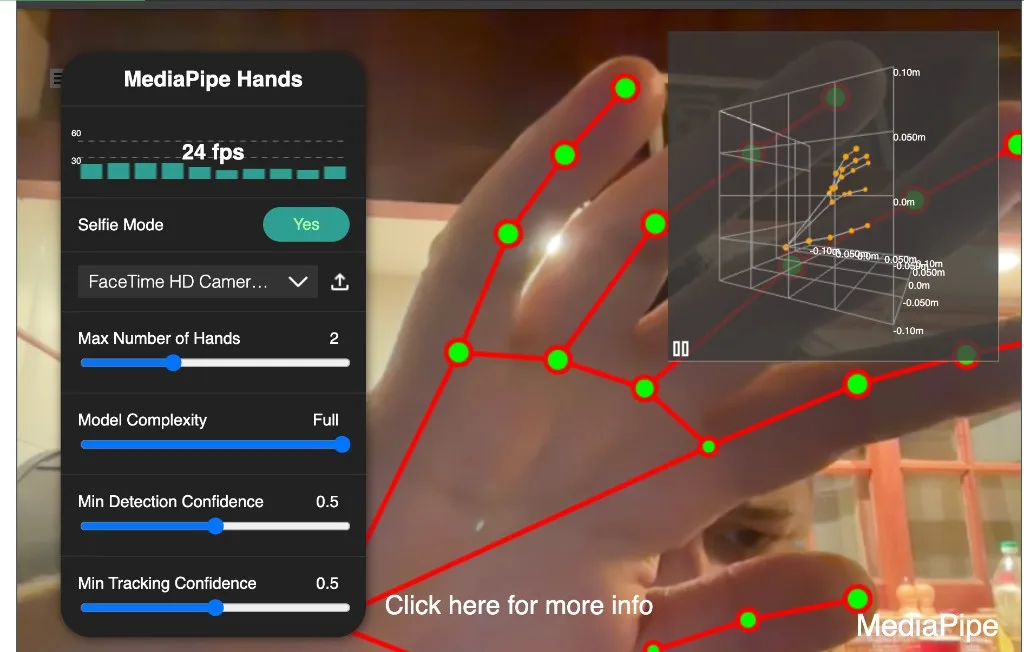
MediaPipe Hands
There is a particular magic in watching your own fingers move in real space while a browser—not a native app, not a GPU workstation in the basement—draws a skeleton that follows.
That is what this CodePen is for: MediaPipe Hands running entirely in the tab. Your webcam feeds the model. The main canvas shows the 2D overlay—bones and joints painted on the video. A small panel in the corner hosts a 3D landmark grid where the same joints float in world coordinates, wired together like a miniature rig you can orbit with your hands.
No install. No Python server. Just models pulled from a CDN, a control panel, and the quiet thrill of pose estimation at desk scale.
Try it live
Allow the camera when prompted (the embed must request camera access—your browser will ask). Wave one hand, then two. Toggle Selfie Mode so the mirror feels natural. Watch the FPS counter settle once the WASM graph warms up.
Camera blocked or blank embed? Open the demo in a new tab or try the CodePen fork.
This page hosts a blog-side copy in assets/demo/ with the same UI as the CodePen: collapsible control panel (hamburger), live FPS graph, selfie toggle, camera picker, hand-count and confidence sliders, loading spinner, 3D landmark grid, and MediaPipe branding. The CodePen is still the forkable source; the local copy is what runs in the iframe above.
Two views of the same hands
Most webcam toys stop at stickers on a flat image. This one deliberately splits the story:
| View | What you see | Coordinates |
|---|---|---|
| Main canvas | Video frame + colored connectors and joint dots | Normalized image space (good for drawing on pixels) |
| Corner grid | Wireframe skeleton in a 3D box | World landmarks in meters (good for depth and spatial reasoning) |
Your brain reads the video overlay as “it sees my hand.” The grid answers the next question: “where is my hand in space?” That second channel is what makes the demo feel like a pipeline rather than a filter.
Left and right hands get distinct colors on the 2D layer—green versus red—so when both appear you can still parse ownership. The 3D grid merges multiple hands into one landmark list and offsets bone indices so connections do not cross between hands.
What MediaPipe Hands is doing
Under the hood, the solution is a compact graph:
webcam frame → hand detection → 21 landmarks per hand → 2D + 3D outputs
For each detected hand you receive:
multiHandLandmarks— 21 points in normalized image coordinates (wrist, knuckles, fingertips)multiHandWorldLandmarks— the same topology in a metric-ish 3D space relative to the cameramultiHandedness— left vs right classification (note: in selfie mode “left” is from the model’s perspective, not always your mirror intuition)
The drawing path on each frame is straightforward: clear the canvas, blit the camera image, loop hands, stroke HAND_CONNECTIONS, paint landmarks. Depth even modulates dot size—landmarks closer to the camera grow slightly larger via a lerp on the z component:
drawingUtils.drawLandmarks(canvasCtx, landmarks, {
  color: isRightHand ? '#00FF00' : '#FF0000',
  fillColor: isRightHand ? '#FF0000' : '#00FF00',
  radius: (data) => {
    return drawingUtils.lerp(data.from.z, -0.15, .1, 10, 1);
  }
});
That tiny detail matters: without an explicit depth cue, the overlay can feel like flat clipart. With it, the skeleton breathes as you lean toward the lens.
The 3D grid: cooking two hands into one rig
LandmarkGrid from MediaPipe’s control utilities expects a single landmark array and a connection list. When two hands are active, the demo concatenates world landmarks and reindexes edges:
const landmarks = results.multiHandWorldLandmarks.reduce(
    (prev, current) => [...prev, ...current], []);
let connections = [];
for (let loop = 0; loop < results.multiHandWorldLandmarks.length; ++loop) {
  const offset = loop * mpHands.HAND_CONNECTIONS.length;
  const offsetConnections = mpHands.HAND_CONNECTIONS.map(
      (connection) =>
          [connection[0] + offset, connection[1] + offset]);
  connections = connections.concat(offsetConnections);
  // ... per-hand color metadata for left/right
}
grid.updateLandmarks(landmarks, connections, colors);
When no hands are present, the grid clears—no stale floating bones. The range is tight (0.2 meters) so motion stays readable in the inset; labels carry an m suffix to remind you these are world-space numbers, not arbitrary shader units.
The control panel (the knobs that matter)
The panel is not decoration—it is how you stress-test the tracker:
| Control | Effect |
|---|---|
| Selfie Mode | Horizontally flips the hidden video element so movement matches a mirror |
| Max Number of Hands | Up to four—useful for “clap then separate” moments and party tricks |
| Model Complexity | Lite vs Full—latency vs robustness on difficult poses |
| Min Detection Confidence | How sure the model must be before it claims a new hand |
| Min Tracking Confidence | How sure it must stay before it drops tracking |
SourcePicker wires the webcam through hands.send({ image }) and resizes the output canvas to the viewport while preserving aspect ratio—landscape phones and ultrawide monitors both get a sane frame without stretching fingers into noodles.
Models load from jsDelivr with a version pinned to the Hands package:
const config = {
  locateFile: (file) => {
    return `https://cdn.jsdelivr.net/npm/@mediapipe/hands@${mpHands.VERSION}/${file}`;
  }
};
const hands = new mpHands.Hands(config);
hands.onResults(onResults);
The first seconds show a spinner; when results arrive, document.body gains loaded and the spinner fades—small UX, but it sets expectations while WASM initializes.
Why this still belongs in a creative-coding notebook
Hand tracking is the hello world of spatial interfaces. Once landmarks stream at 30fps in the browser, you can imagine:
- Gesture shortcuts — pinch to confirm, palm to cancel, thumbs-up as a hotkey
- Music and art — fingertips as oscillators, wrist height as a filter cutoff
- Accessibility experiments — camera-as-input when keyboard or mouse is awkward
- AR prototypes — world landmarks feed Three.js bones without leaving the tab
- Sign-language sketches — not production-ready recognition, but an honest sandbox for motion capture
MediaPipe does the heavy lifting: robust hand boxes, consistent topology, reasonable world coordinates. Your job is the semantics on top—what a curl of the index finger means in your app.
The pen stays Chrome-first (with a polite device-detector warning elsewhere) because that is where the graph was tested hardest when the demo was written. Fork it anyway—just know you are trading support for curiosity.
Hand tracking vs cousins
| Approach | Best for |
|---|---|
| MediaPipe Hands (this pen) | Fast 21-point skeleton, browser, multiple hands |
| MediaPipe Holistic / Pose | Full body + face mesh when hands are not enough |
| WebXR hand input | VR controllers with platform APIs—no webcam |
| Depth cameras (RealSense, etc.) | Metric room-scale scenes; hardware cost |
| Training your own model | Custom gestures or domains MediaPipe never saw |
Reach for Hands when you want finger-level interaction without shipping a native binary. Reach for pose when the story is shoulders and gait. Reach for hardware depth when millimeters in a room matter.
What I would change today
If I refreshed the pen now:
- Tasks Vision API — migrate from the classic
@mediapipe/handsgraph to the newer Hand Landmarker task API where maintenance is headed - npm / Vite module — same logic, but imports instead of globals on
window - Privacy copy — one line that frames are processed locally and never uploaded (true for this pen; say it out loud)
- HTTPS-only assets — drop legacy
http://logo links that browsers may block on secure embeds - Gesture layer — a tiny state machine on landmark angles (pinch distance threshold) to prove the skeleton is input, not just decoration
- Three.js hand mesh — drive a rig from
multiHandWorldLandmarksin the main viewport, not only the inset grid
None of that changes the core lesson: the browser can estimate 3D structure from a flat camera feed, and when you show both the video overlay and the world grid, people immediately understand what “landmarks in space” means.
The lesson I still keep
The best perception demos do not lecture about tensors. They let you wiggle your fingers and watch something faithful follow.
This pen is not a productized sign-language engine or a VR shell. It is a well-lit window into MediaPipe’s hand graph: confidence sliders, selfie flip, FPS tick, and that corner grid reminding you that every green dot on the video has a coordinate in meters somewhere off your wrist.
Fork it, log the landmarks to the console, map a pinch to play/pause on your favorite track. You will stop thinking of computer vision as a cloud API and start thinking of it as geometry arriving frame by frame—which is exactly what it is.
Demo: assets/demo/ · CodePen: codepen.io/maggiben/pen/MWvVYqy · MediaPipe: developers.google.com/mediapipe