
I Almost Got Hacked by a Fake Recruiter's Take-Home Assignment
April 10, 2025
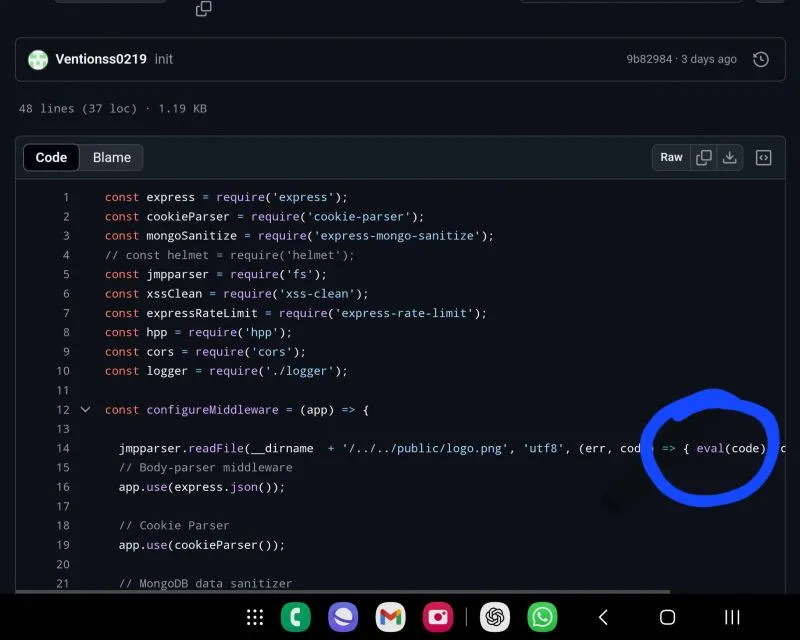
A message arrives from a premium LinkedIn profile. The role pays well above market. The process moves fast: a short chat, then a technical screen—please clone this repo and fix a few bugs before tomorrow.
That almost happened to me.
I did not run the code on my daily machine. Others were not as lucky. What looks like a normal hiring loop is, for many developers right now, Operation Dream Job and the related Contagious Interview campaigns: North Korea–linked actors posing as recruiters to deliver malware through take-home assignments and “skill tests.”
The LinkedIn thread that prompted this post is still relevant—premium and verified badges are not proof of humanity or intent.
How the scam works
The playbook is repeatable because it mirrors real hiring:
- Approach — LinkedIn DM or email; polished profile; sometimes a stolen or purchased Premium account so the message feels legitimate.
- Hook — Remote role, strong compensation, urgent timeline. Flattery helps.
- “Skill test” — Clone a private GitHub repo, debug a small Node.js or Python app, run
npm install/pip install, complete a take-home. - Payload — Malware in dependencies, post-install scripts, or “fix this bug” branches. Infostealers target browser passwords, session cookies, and crypto wallet extensions (campaigns such as BeaverTail and InvisibleFerret have been widely reported in this context—see DevOps.com and SecurityOnline).
- Silence — Ghosted after you run the code; your machine is the product.
A comment on my post described the same shape: download a Node.js ecommerce repo for a debugging exercise—code built to steal Chrome passwords and blockchain wallet private keys when present. That is not a failed interview; it is theft.
flowchart LR
  A[LinkedIn DM] --> B[Fake recruiter]
  B --> C[Take-home repo]
  C --> D[npm install / run]
  D --> E[Infostealer]
  E --> F[Credentials & wallets]
Why developers are targeted
- We run untrusted code for a living—it is the job.
- Take-homes are normalized; saying no can feel like losing an opportunity.
- Many of us keep high-value secrets on the same laptop: SSO sessions, API keys, password managers, browser extension wallets.
- AI and crypto talent is explicitly hunted in recent reporting (Validin on fake job platforms).
Attackers do not need to exploit your employer. They need five minutes on your personal dev environment.
Red flags (beyond “it felt off”)
| Signal | Why it matters |
|---|---|
| Repo hosted on a new or forked org with little history | Disposable infrastructure |
| Urgency—“complete by EOD” | Pressure reduces review |
| Interview only over chat; no call on a corporate domain | Harder to verify employer |
| Premium / Verified sender | Badge verifies payment or ID, not morality |
| Instructions to run on your main machine | Maximizes yield for the attacker |
postinstall scripts, obfuscated JS, or “run this setup binary” | Classic delivery path |
| Job title too good + process too fast | Bait |
None of these is proof alone. Together they should trigger a pause, not a git clone.
How to protect yourself
Treat every take-home as untrusted software—because it is.
- Never on your primary machine — Use a disposable VM (your homelab is perfect for this), a cloud sandbox, or a dedicated “burner” laptop with no passwords, no wallets, no corporate SSO.
- Read before you run —
package.jsonscripts,Makefile,.npmrc, GitHub Actions, anything executable. Search forpostinstall,curl | bash, base64 blobs. - Verify the company out-of-band — Official careers page, known domain email, recruiter listed on the company site. Call the main switchboard if needed.
- Insist on a live video call early — With people who can answer specifics about the team, product, and office—not only text.
- Say no to local admin / wallet access — If they need “realistic” debugging, offer a screen share from the VM or a sanitized snapshot.
- Use a fresh browser profile in the VM — No extensions, no saved logins.
- Snapshot and destroy — Revert the VM after the exercise; do not reuse it for email or banking.
If a legitimate employer cannot accept “I will do this in an isolated environment,” that is useful data about their security culture—or about the scam.
What “verified” does and does not mean
LinkedIn Premium and Verified features increase visibility and trust signals. They do not guarantee:
- That the account was not compromised
- That the person works where they claim
- That the repository is safe to execute
Do not trust anybody because they are premium or verified. Trust process: verifiable employer, proportionate ask, safe execution environment.
If you already ran something suspicious
- Disconnect from the network; do not “just restart.”
- Assume browser profiles, password managers, and wallet extensions on that machine are compromised.
- Rotate passwords and revoke sessions from a different device.
- Move crypto assets if wallets were ever on that host.
- Report to your employer’s security team if work data touched the machine.
- Preserve artifacts (repo URL, hashes, screenshots) for reporting.
Why this is still worth talking about
These campaigns are active, evolving, and aimed at the same people reading job posts between commits. Security teams track Contagious Interview and related names; many applicants never hear them until it is personal.
I nearly became a footnote in someone else’s incident report. The only difference was habit: untrusted code does not run where I live.
If you are hiring: offer structured assessments that do not require arbitrary npm install on a candidate’s daily driver—or provide a sandbox. If you are applying: your career is not worth one reckless clone.
Stay skeptical. Use a VM. Verify the company. The dream job that needs your wallet is not a job.
Published originally on LinkedIn.