
Rings: A WebGL Playground and Why Three.js Is Magic—and Merciless
May 18, 2026
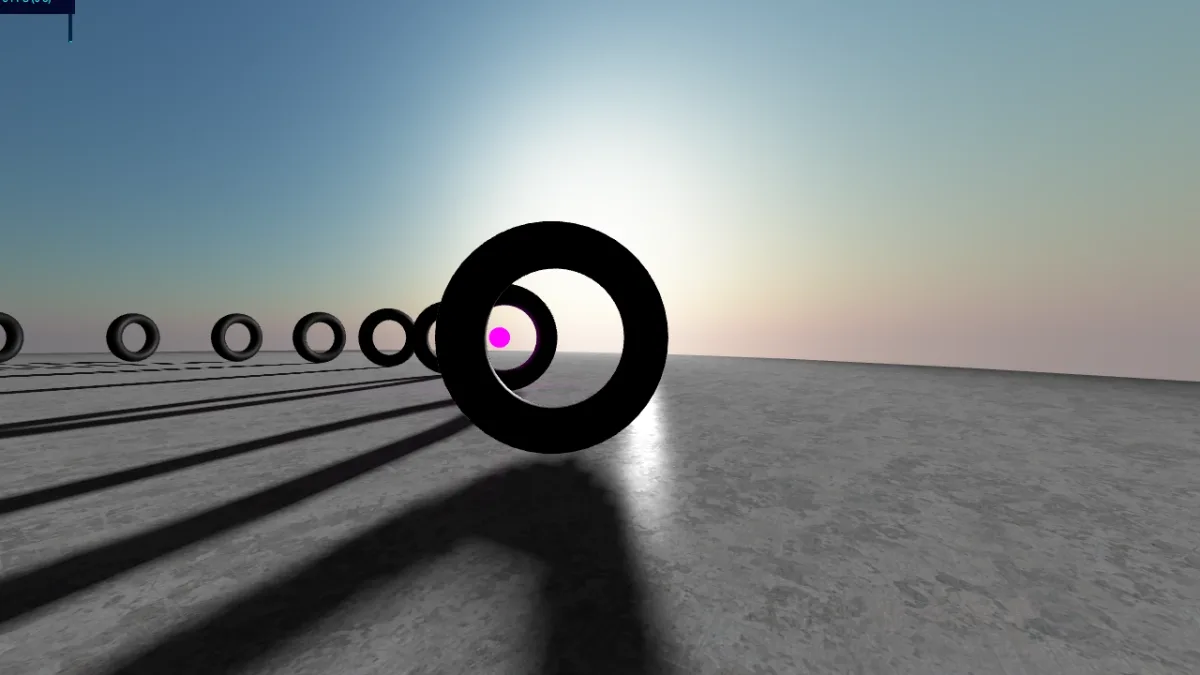
Rings
There is a moment in every WebGL project when the canvas stops being a gray rectangle and becomes a small universe—light, motion, reflection, something you want to show someone without saying “trust me, run npm install.”
Rings is that moment for me: a focused Three.js scene I extracted from an older project (globex), deployed at rings-two.vercel.app. Twenty-four procedural toruses on an elliptical path. A mirror sphere that samples the world every frame with ping-pong cube cameras. A Preetham sky dome. A magenta light doing laps in ten seconds while the main camera takes ninety.
It is not a product. It is a playground—and playgrounds are how you actually learn graphics.
See it live
Drag to orbit, scroll to zoom, right-drag to pan. The demo runs entirely in the browser—no plugin, no native binary.
If the embed is blank (some browsers block third-party WebGL), open the demo in a new tab.
Tiling still works in production—handy if you ever point multiple screens at one giant virtual canvas (a leftover from video-wall experiments):
https://rings-two.vercel.app/?fullWidth=1920&fullHeight=1080&x=0&y=0
Change fullWidth, fullHeight, x, and y to show a window into a larger render target—camera.setViewOffset under the hood.
Why WebGL is still impressive
We are spoiled by CSS and video. WebGL is different: you are scheduling work on the GPU every frame—transforms, materials, lights, sometimes custom shaders that run per pixel.
What still feels like magic:
| Capability | What it buys you |
|---|---|
| Hardware acceleration | Thousands of vertices and complex fragment math at 60fps—on a laptop, in a tab |
| No install | Send a URL; the GPU does the rest |
| Interactive 3D | Orbit, zoom, pan—users explore instead of watching a loop |
| Shaders | Skies, water, stylized materials impossible to fake with DOM alone |
| Dynamic environments | Real-time reflections via cube maps—Rings updates two cube cameras alternately so the chrome sphere sees a moving world |
The scene is not photorealistic film VFX. It is immediate: change a uniform, refresh, see. That feedback loop is why graphics people fall in love with the browser as a platform. (The hero image above is a frame from the live build—open the embed if you want motion.)
What Rings is doing (without drowning in jargon)
Boot is simple: index.html → Main.js → dynamic import of Rings.js. From there:
- Sky — analytic Preetham scattering in
SkyShader.js; sun position drives a spotlight that tracks the dome. - Donuts — 24
TorusGeometryinstances on anEllipsecurve; each material is procedural canvas noise (Perlin, patterns fromtooloud), random UV scale per mesh. - Mirror sphere — hide the sphere, render the scene into cube map A or B, assign to
envMap, show the sphere again—every frame. - Motion — two tweens: 90s camera path around the ellipse, 10s loop for the glow ball’s
PointLight. - Floor — tiled metal texture, shadows on.
Lights and legacy camera hints live in Scenario.json. OrbitControls with damping so the thing feels tactile.
A Playwright smoke test (npm run test:webgl) loads the page headlessly and fails if the framebuffer is basically black—because “it works on my machine” is not a strategy for WebGL CI.
Why Three.js is hard anyway
Three.js is the good news: it wraps WebGL’s ceremony. It is also the honest news: you are still thinking like a graphics programmer, just with better names.
1. Mental model overload
Scene graph, cameras, render targets, materials, lights, gamma, color spaces, UVs, normals… The docs are fine; the integration is where beginners drown. One wrong lookAt and your sun points into the floor for a week.
2. The render loop is your real main()
Everything reactive eventually boils down to:
update state → maybe render to target → render scene → repeat
Miss an order—update cube map after moving the object that was hidden for that pass—and you get shimmering lies instead of reflections.
3. Shaders are a second programming language
GLSL looks small until you need branching, precision, or to debug why the sky is purple at noon. Rings’ sky shader came from established Preetham examples; even then, uniform naming and Three.js version drift cost real time.
4. Performance is always lurking
Rings renders two extra cube faces × six directions × 512² per frame for the mirror ball, alternately. Fine on a desktop. On a tired phone tab, next to Slack and Spotify, you learn humility fast. The README lists sensible next steps: lower cube resolution on mobile, pause env updates when the tab is hidden, code-split the ~760KB chunk.
5. Debugging is vibes until it isn’t
Black screen? Wrong near/far plane. Z-fighting? Camera inside mesh. envMap frozen? You forgot to hide the reflective mesh during the cube pass. stats.js in the corner is not decoration—it is a lifeline.
6. Legacy and ecosystem scars
This repo still aliases old tween imports to @tweenjs/tween.js. Scenario JSON carries lights from an earlier era. That is normal in graphics code: you do not rewrite; you coax forward.
The advantages that keep me coming back
Despite the pain:
- Reach — One URL beats shipping a desktop binary for a visual experiment.
- Iteration speed — Vite hot reload + browser devtools beat many native compile cycles.
- Expressiveness — Procedural textures in Canvas, slap on a mesh, instant art direction.
- Portfolio gravity — People feel 3D in a way they do not feel another REST API diagram.
Rings is MIT-licensed on GitHub. Clone it, break the sky, add a ?debug=1 tube along the path—the README lists grounded improvements (GUI for Preetham params, visibility pause, TypeScript types).
How this fits my other rabbit holes
Not every project needs WebGL. My ERP for La Esquina needed receipts that print and stock that matches góndola. Elliott needed privacy and IndexedDB. Rings needed wonder—the kind you get when math becomes light.
That diversity is the point. WebGL will not replace forms and databases. It reminds you why you learned to code: to make something alive on screen.
Try it yourself
git clone https://github.com/maggiben/rings.git
cd rings
npm install
npm run dev
Open http://localhost:5173/, wait for the donuts, orbit until dizzy. Read src/Rings/Rings.js with the loop in one hand and the Three.js docs in the other.
If you only do one thing: change the ellipse radius and watch the whole composition change. That is the lesson—small parameters, large poetry, and a GPU willing to draw it sixty times a second.
Live demo: rings-two.vercel.app. Code: github.com/maggiben/rings. MIT © 2026.