
3D Pipes: When a Screensaver Was Your Desktop Personality
May 30, 2026
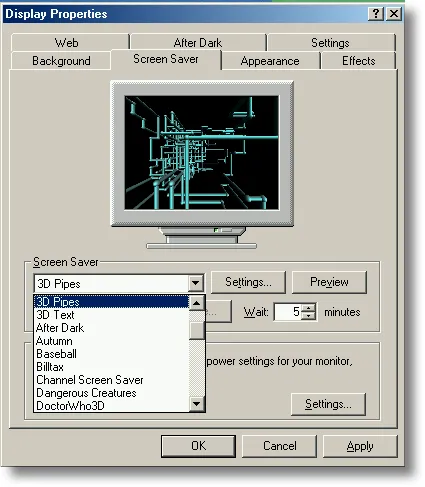
3D Pipes
There was a time when personalizing your computer meant opening Display Properties, clicking the Screen Saver tab, and choosing who you were for the next five minutes of idle time.
Flying toasters. Starfield. Mystify. 3D Pipes—cyan tubes crawling through black space like plumbing in a fever dream. You picked one, set the wait timer, maybe hit Preview and watched your monitor pretend it was a showroom floor. That was not decoration. That was identity.
Today the screensaver still exists, but mostly as a default: a lock screen, a dim photo, a corporate policy. Some people still play with them—Matrix rain on a second monitor, cmatrix in a terminal, a nostalgic .scr copied from an old XP install. The culture around them has thinned. The old ritual—which saver are you?—has largely passed.
I missed the pipes enough to rebuild them. Not as a .scr, but as a browser demo with Three.js and a small React shell on CodePen. Same hypnotic grid logic. Same metallic joints. And yes: teapots, because the original had an easter egg and nostalgia without the teapot is incomplete.
See it live
Full viewport. Black background. One pipe at a time, growing segment by segment until the scene fills or gets stuck—then a fade and a fresh lattice.
Click inside the embed so the canvas can render. If WebGL is blocked, open the pen on CodePen.
Wait thirty seconds. Watch a joint become a Utah teapot instead of a sphere. That two-and-a-half percent chance is deliberate—it is the wink the Windows version gave anyone who dug into Settings and enabled teapots at joints.
When screensavers mattered
Screensavers were born from hardware, not aesthetics. CRT phosphors could burn in static images—menu bars, taskbars, the Lotus 1-2-3 grid left on overnight. A moving image spread the glow and saved the tube.
Then they became something else entirely.
| Era | What changed | What it felt like |
|---|---|---|
| 1980s–90s | Burn-in protection, then After Dark and third-party .scr culture | Your desk had personality; savers were shareware and jokes |
| Windows 95–XP | Built-in OpenGL and Direct3D demos shipped with the OS | 3D Pipes in Display Properties = you cared about graphics |
| Flat LCD | Burn-in largely gone; panels always on | Savers become optional, then invisible |
| Today | Lock screen, sleep, phone always-on displays | Motion is security or ambient, rarely self-expression |
The cover image above is the ritual frozen in amber: Display Properties → Screen Saver → 3D Pipes → Wait: 5 minutes. Dropdown full of names—After Dark, Autumn, Dangerous Creatures—each one a tiny statement. Nobody talks about their screensaver at lunch anymore. But mention 3D Pipes to someone who ran Windows NT or 95, and they know exactly which tubes you mean.
Raymond Chen told the origin story on The Old New Thing: the Windows OpenGL team had shipped hardware-accelerated OpenGL in NT 3.5, but nothing in the product showed users it existed. A team screensaver contest produced 3D Text, 3D Maze, 3D Flying Objects, and 3D Pipes. Marketing saw them and said, in effect: skip the vote—we are shipping all of them. Low risk, high visibility. If a saver crashed, support could say do not use that one—this was before auto-update culture.
That is how a demo became folklore.
How the original worked (the short technical version)
The file was sspipes.scr. From Windows NT 4.0 through Me, it ran on OpenGL; Windows XP rebuilt it for Direct3D. Vista dropped the classics; fans still copy .scr files from old installs and hope for the best on modern GPUs.
Under the hood, the idea is simpler than the hypnotic result suggests:
- Discrete 3D grid — Space is carved into cells. Each cell knows whether it is empty or occupied. A pipe cannot cross itself or another pipe’s path.
- Growing segments — A pipe starts at a random free cell, picks a cardinal direction, and extends a fixed number of grid steps. Cylinders stretch between joints; spheres (or flex joints, depending on settings) connect corners.
- Turn rules — At each joint, the next direction must not be the 180° opposite of the current one—otherwise the pipe would fold back on itself. Among valid turns, pick one with clear cells ahead.
- Multiple pipes, then reset — Several pipes grow in parallel until the scene is crowded or stuck. The screen clears—originally with a checkerboard wipe on older builds, a fade on XP—and the cycle restarts.
- Materials and lighting — Phong-style shading on metal-ish surfaces; palette colors from the classic 16-color VGA set. Settings exposed resolution, joint style (elbow vs. ball), and speed.
The OpenGL implementation used gluCylinder and gluSphere (and friends) from the GLU utility library—immediate-mode 3D that felt cutting-edge on a Pentium with a passable graphics card. Source samples lived in the old SDK under paths like MSTOOLS\SAMPLES\OPENGL\SCRSAVE for developers who wanted to study or extend them.
The teapot easter egg is the graphics in-joke: the Utah teapot is the hello-world of 3D rendering. Enable teapots in the Windows 2000+ settings, and joints occasionally spawn teapots instead of spheres. My rebuild keeps that spirit with a 2.5% chance per joint.
How the browser version works
The CodePen is React + Three.js via ESM, no build step—same spirit as my other UI experiments from 2013, but with WebGL instead of CSS 3D transforms.
The core loop mirrors the original’s grid logic:
const GRID_SIZE = 20;
const BOUNDS = 400;
const occupiedPositions = new Set<string>();

// Each cell keyed as "x,y,z" — collision is O(1)
const getPosKey = (v: THREE.Vector3) =>
  `${Math.round(v.x)},${Math.round(v.y)},${Math.round(v.z)}`;
Path planning walks the grid before committing: isPathClear steps cell by cell; reservePath marks cells taken so pipes never overlap. Turn selection filters out the reverse direction, shuffles the rest, and picks the first path with enough free cells.
Geometry is primitive but faithful:
| Piece | Three.js | Role |
|---|---|---|
| Pipe segment | CylinderGeometry scaled on Z | Grows incrementally each frame (scale.z = distanceTraveled) |
| Joint | SphereGeometry | Corner connector |
| End cap | Larger sphere | Start/end of a run |
| Teapot | TeapotGeometry | Easter egg at joints |
| Reset | Full-screen black plane with rising opacity | Fade instead of checkerboard wipe |
Materials use MeshPhongMaterial with modest shininess—close enough to the metallic pipes you remember on a CRT. Lighting is a simple ambient + directional pair; no image-based lighting, no PBR. This is a saver, not a Pixar still.
Motion: one active pipe (MAX_PIPES = 1 in this pen—tighter and cleaner than the original’s four-to-six), speed in world units per frame, random segment lengths between 2–6 grid cells, random cap on total segments before the pipe stops and respawns. Every 32 seconds the scene clears, the camera’s Y rotation gets a slight random nudge, and a new pipe begins.
The render loop is the same contract as every Three.js app—and every old OpenGL screensaver:
update pipe positions → grow or turn → maybe fade → render → requestAnimationFrame
No UI. No orbit controls. You watch. That restraint is the point.
Old stack vs new stack
Windows sspipes.scr | This CodePen | |
|---|---|---|
| Runtime | Native .scr, OpenGL / Direct3D | Browser, WebGL via Three.js |
| Grid | Internal occupancy map | Set of string keys on a 20³-style lattice |
| Primitives | GLU cylinders/spheres | CylinderGeometry, SphereGeometry, TeapotGeometry |
| Reset | Checkerboard or fade | Alpha fade on a camera-facing plane |
| Customization | Display Properties, teapot toggle | Fork the pen, tweak TEAPOT_CHANCE |
| Purpose | Show off OS 3D + save CRTs | Nostalgia + learn WebGL in a tab |
Three.js does not make the algorithm easier—it makes the delivery easier. One URL, no .scr signing, no copying binaries from XP. The hard part is still the grid, the turns, and the grow-until-stuck rhythm.
Why rebuild a screensaver at all?
Because some demos are time capsules. 3D Pipes advertised OpenGL in an era when that mattered. It also happened to be beautiful—industrial, pointless, meditative. The same qualities that made it a good saver make it a good creative coding exercise: finite state, clear rules, immediate visual payoff.
Screensavers as culture may not come back. Always-on displays and sleep modes won that war. But the impulse behind them—make idle time beautiful—shows up elsewhere: ambient mode on a TV, generative art in a terminal tab, a WebGL pen left running while the coffee brews.
I run this one sometimes on a second monitor. Not because the pixels need saving. Because the pipes still know how to fill a room with quiet motion.
Try it yourself
Fork the pen or paste the logic into a Vite project:
- Pen: codepen.io/maggiben/pen/NPbXeoX
- Tweak:
SPEED,MAX_PIPES,TEAPOT_CHANCE,PALETTE - Extend: Multiple simultaneous pipes, flex joints that bend instead of hard elbows, checkerboard wipe shader for the reset
If you remember the Display Properties dialog, open the embed and wait for a teapot. If you do not, wait anyway—the pipes were always worth the wait.
Cover: Windows Screen Saver settings with 3D Pipes selected. Demo: CodePen. Related: Rings — WebGL playground.